ChatGPT Invisible Watermark Remover
Discover how to detect and remove invisible watermark characters from ChatGPT-generated text. Learn about zero-width Unicode characters and how to clean them from your AI text.
Recently, there's been a lot of discussion about whether ChatGPT embeds invisible watermarks in its generated text. Some developers have claimed to find hidden Unicode characters that act as watermarks, while OpenAI has stated that these characters are unintentional byproducts rather than official watermarks. Regardless of their origin, these invisible characters can cause real problems when working with ChatGPT-generated content.

As shown in the discussion above, OpenAI states that special characters like the Narrow No-Break Space in some outputs are unintentional byproducts of reinforcement learning, not official watermarks. However, developers like Riley Coyote have built decoders to find and remove these hidden Unicode characters, demonstrating that they do exist in ChatGPT outputs.
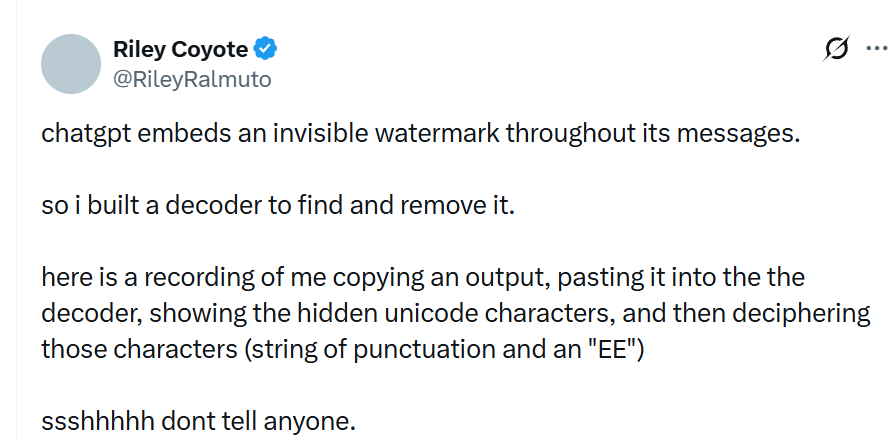
The reality is that whether these characters are intentional watermarks or accidental artifacts, they're present in some ChatGPT outputs and can cause issues. That's where an invisible watermark remover comes in handy.
What Are ChatGPT Invisible Watermarks?
ChatGPT invisible watermarks are special Unicode characters that are embedded in the text but are completely invisible to the naked eye. These characters don't take up any visual space - you won't see them when reading the text, but they're definitely there in the underlying character data.
These characters are part of the Unicode standard, maintained by the Unicode Consortium. While they serve legitimate purposes in typography and complex scripts, when they appear unexpectedly in AI-generated text, they can cause problems.
The most common types found in ChatGPT outputs include:
| Type | Name | Unicode | Description |
|---|---|---|---|
| ZWJ | Zero Width Joiner | U+200D | A non-printing character that joins adjacent characters, commonly used in emoji sequences |
| ZWSP | Zero Width Space | U+200B | An invisible character with zero width, used for word separation in some scripts |
| ZWNJ | Zero Width Non-Joiner | U+200C | Prevents the joining of adjacent characters in scripts like Persian and Arabic |
| WJ | Word Joiner | U+2060 | Prevents line breaks between words |
| NBSP | Non-Breaking Space | U+00A0 | A space character that prevents automatic line breaks |
References: All these characters are officially defined in the Unicode Standard. For detailed technical specifications, see the Unicode Character Database.
Why Do These Characters Appear in ChatGPT Outputs?
According to OpenAI's official statements, these characters are not intentionally added as watermarks. Instead, they may appear as:
Unintentional byproducts: Special characters like the Narrow No-Break Space can be unintentional byproducts of the reinforcement learning process used to train ChatGPT.
Model artifacts: During the training and fine-tuning process, the model may learn to use these characters in certain contexts, even if they weren't explicitly intended.
Text processing pipeline: These characters might be introduced during various stages of text processing, from tokenization to final output generation.
Inconsistency: OpenAI notes that these characters are inconsistent across models and outputs, making them unreliable for detection purposes.
However, regardless of whether they're intentional or accidental, the presence of these invisible characters can cause real problems for developers and content creators.
Problems Caused by Invisible Watermarks
These invisible characters can wreak havoc in several scenarios:
Code and Programming Issues When you paste ChatGPT-generated text into code, these characters can break parsers, cause string length mismatches, and create unexpected behavior:
const text = "Hello\u200BWorld"; // Contains zero-width space
console.log(text.length); // Returns 11, not 10
console.log(text === "HelloWorld"); // Returns false!
Database Storage Problems Some database systems don't handle these special characters well, leading to:
- Encoding errors during insertion
- Search failures (queries won't match text with hidden characters)
- Index corruption in some systems
Text Processing Failures Regex patterns and text processing tools can fail when these characters are present:
// This regex won't match if there's a zero-width character
const pattern = /^HelloWorld$/;
const text = "Hello\u200BWorld";
console.log(pattern.test(text)); // Returns false!
API Integration Issues Many APIs expect clean text without special Unicode characters, which can cause:
- JSON parsing errors
- API validation failures
- Unexpected behavior in REST API calls
AI Detection Perhaps most importantly, these invisible characters can be detected by AI detection tools, revealing that your content was generated by ChatGPT. This is particularly problematic if you want your content to appear human-written.
How to Detect Invisible Watermarks in ChatGPT Text
Before you can remove these characters, you need to detect them. Here are several methods:
Method 1: Using JavaScript in Browser Console
// Check for zero-width characters in ChatGPT text
const text = "Your ChatGPT text here";
const hasZWJ = /\u200D/.test(text);
const hasZWSP = /\u200B/.test(text);
const hasZWNJ = /\u200C/.test(text);
const hasWJ = /\u2060/.test(text);

console.log('Zero-Width Joiner:', hasZWJ);
console.log('Zero-Width Space:', hasZWSP);
console.log('Zero-Width Non-Joiner:', hasZWNJ);
console.log('Word Joiner:', hasWJ);
Method 2: Using Python
# Check for zero-width characters
text = "Your ChatGPT text here"
zero_width_chars = {
    'ZWJ': '\u200D',
    'ZWSP': '\u200B',
    'ZWNJ': '\u200C',
    'WJ': '\u2060'
}

for name, char in zero_width_chars.items():
    if char in text:
        print(f'{name} found: {text.count(char)} occurrences')
Method 3: Using Online Unicode Analyzers
- Unicode Inspector - Paste your text to see all Unicode characters
- Unicode Character Detector - Converts text to Unicode code points
Method 4: Using Text Editors Many code editors can reveal these characters:
- VS Code: Install the "Zero Width Characters" extension
- Sublime Text: Use the "Unicode Character Highlighter" plugin
- Vim: Use
:set listto show invisible characters
How to Remove Invisible Watermarks from ChatGPT Text
Now that you know what to look for, here's how to remove these invisible characters from your ChatGPT-generated text.
Start cleaning your ChatGPT text now → The process is simple and happens entirely in your browser - no downloads, no installations, and most importantly, your text never leaves your computer.
Step 1: Copy Your ChatGPT Text
First, copy the text you want to clean from ChatGPT. Whether it's a single response or multiple conversations, just copy it like you normally would.
Step 2: Paste and Clean
Head over to the invisible watermark remover tool and paste your ChatGPT text into the input box. The tool will automatically scan for all zero-width characters and remove them while preserving everything else.
The tool uses JavaScript regular expressions to detect and remove:
\u200B(Zero Width Space)\u200D(Zero Width Joiner)\u200C(Zero Width Non-Joiner)\u2060(Word Joiner)
All processing happens entirely in your browser using client-side JavaScript - no data is sent to any server. You can verify this by:
- Opening your browser's Developer Tools (F12)
- Going to the Network tab
- Running the cleaning tool
- Confirming no network requests are made
Step 3: Get Your Clean Text
Once cleaning is complete, you'll see:
- Watermark Statistics: A summary showing how many invisible characters were detected and removed
- Cleaned Text Preview: Your text with all invisible watermarks removed
- One-Click Copy: A button to instantly copy the cleaned text to your clipboard
That's it! Your ChatGPT text is now free of invisible watermark characters and ready to use.
Why Use a ChatGPT Invisible Watermark Remover?
There are several compelling reasons to clean invisible watermarks from ChatGPT text:
1. Make Content Appear Human-Written One of the most common reasons is to make AI-generated content appear as if it were written by a human. When you submit content to platforms, academic institutions, or clients, those invisible watermark characters can be detected by AI detection tools, revealing that the text was generated by ChatGPT.
By cleaning these invisible markers, the text becomes indistinguishable from human-written content at the character level. This is particularly important for:
- Content creators who want their AI-assisted work to pass AI detection checks
- Students who use ChatGPT as a writing assistant
- Businesses that need authentic-appearing content
- Writers who use ChatGPT for brainstorming and drafting
2. Prevent Technical Issues As we discussed earlier, these invisible characters can cause real technical problems in code, databases, APIs, and text processing systems. Removing them prevents these issues before they occur.
3. Ensure Clean Data Cleaned text is more consistent and easier to work with. It reduces unexpected bugs and makes your code more reliable.
4. Privacy and Security Since the cleaning tool runs entirely in your browser, your ChatGPT text never leaves your computer. This ensures complete privacy, which is especially important when working with sensitive or confidential content.
Frequently Asked Questions
Q: Does ChatGPT intentionally watermark its outputs?
According to OpenAI's official statements, ChatGPT does not intentionally leave Unicode watermarks. Special characters like the Narrow No-Break Space in some outputs are unintentional byproducts of reinforcement learning, not official watermarks. However, these characters do appear in some outputs and can be detected and removed.
Q: Will removing invisible watermarks affect my text formatting?
No. These watermark characters are completely invisible and don't contribute to the visual appearance of your text. When you remove them, your text will look exactly the same - just without the hidden tracking characters.
Q: Is my ChatGPT text sent to a server when I use the remover?
No. Everything happens locally in your browser. Your text never leaves your computer, ensuring complete privacy. You can verify this by checking the Network tab in your browser's Developer Tools.
Q: Can I remove watermarks from other AI tools, not just ChatGPT?
Yes. The tool works with text from any AI service that uses these invisible watermark characters - ChatGPT, Claude, Gemini, or any others. If they're using zero-width characters, the tool will detect and remove them.
Q: What if the tool doesn't detect any watermarks?
That's fine. It just means your ChatGPT text doesn't have any of the common invisible watermark characters. Either the specific output doesn't contain them, or ChatGPT used a different method (or none at all) for that particular response.
Q: Will removing watermarks violate OpenAI's terms of service?
This is a gray area. Generally speaking, cleaning invisible tracking characters from text you've generated is similar to removing cookies or tracking pixels from websites. You're not modifying the actual content, just removing metadata. However, it's always best to review the OpenAI Terms of Use and consult with legal counsel if you have concerns.
Q: Are there other types of watermarks besides invisible Unicode characters?
Yes. Some AI services may use:
- Statistical watermarking (patterns in word choice or sentence structure) - see research by Kirchenbauer et al.
- Semantic watermarking techniques
- Other steganographic methods
This tool only removes visible Unicode zero-width characters, not statistical or semantic watermarks.
Technical Details
How the remover works: The tool uses JavaScript regular expressions (String.replace() with Unicode escape sequences) that run entirely in your browser's JavaScript engine. No external APIs, no server calls, no data transmission.
Supported characters: The tool removes:
- Zero Width Space (U+200B)
- Zero Width Joiner (U+200D)
- Zero Width Non-Joiner (U+200C)
- Word Joiner (U+2060)
- Non-Breaking Space (U+00A0) - optional
Limitations:
- The tool only removes the specific zero-width characters listed
- If your text contains legitimate uses of zero-width characters (like emoji sequences that require ZWJ), removing them might break those sequences
- Very large texts (over 50MB) may cause browser slowdowns
- The tool preserves all other formatting
Additional Resources
If you want to dive deeper into the technical aspects:
- Unicode Consortium: The official source for Unicode standards
- Unicode Technical Reports: Detailed technical documentation
- W3C Character Model: Web standards for character handling
- MDN Web Docs - Regular Expressions: Guide to using regex in JavaScript
- Research on AI Watermarking: Academic papers on watermarking techniques
Bottom Line
Whether ChatGPT's invisible characters are intentional watermarks or accidental artifacts, they can cause real problems. A good invisible watermark remover makes it easy to detect and clean these characters from your ChatGPT text.
The process is simple: paste, clean, copy. Three steps, and your text is free of invisible watermark characters. Since everything happens locally in your browser, your privacy is completely protected.
If you're using ChatGPT regularly (and let's be honest, who isn't these days?), this tool is worth bookmarking. Those invisible characters can be a real pain, and it's nice to have a quick way to get rid of them.
Ready to clean your ChatGPT text? Start now → Give it a try and see how many invisible watermarks are hiding in your ChatGPT outputs!
More Posts

How To Remove ChatGPT Watermark
Tired of hidden watermark characters in ChatGPT-generated text? This tutorial shows you step-by-step how to detect and clean zero-width characters and hidden markers in AI text.
How To Remove Watermarks From ChatGPT Text
Discover how to detect and remove invisible watermark characters from ChatGPT-generated text. Learn step-by-step methods to clean your AI text and avoid hidden Unicode characters that can cause issues.

Does ChatGPT Really Have Watermarks
Get the real answer about ChatGPT watermarks. We investigate the claims, examine the evidence, and reveal what's actually happening with AI-generated text detection.