How To Get ChatGPT To Remove Watermarks
Discover effective prompting techniques and methods to get ChatGPT to generate clean text without invisible watermark characters. Learn how to request watermark-free output directly from ChatGPT.
You know that feeling when you copy text from ChatGPT and paste it somewhere, only to discover it has those invisible watermark characters that mess everything up? I've been there too. But here's the thing - what if you could get ChatGPT to generate clean text without watermarks in the first place?
That's what we're going to explore today. Instead of cleaning watermarks after the fact, let's talk about how to prompt ChatGPT to give you clean, watermark-free text from the start.
Understanding the Watermark Problem
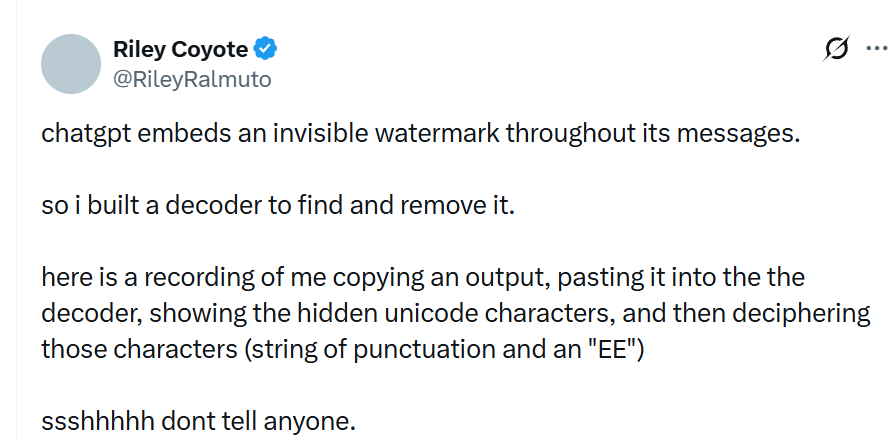
First, let's quickly recap what we're dealing with. ChatGPT (and other AI tools) sometimes embed invisible Unicode characters in their output. These are called zero-width characters - things like Zero-Width Joiners (ZWJ), Zero-Width Spaces (ZWSP), and similar markers that you can't see but can definitely cause problems.
While there's ongoing research into AI watermarking techniques (see Kirchenbauer et al., 2023 and Zhao et al., 2023), the specific use of zero-width characters by commercial AI services like ChatGPT is not officially documented in their public specifications. However, users have reported finding these characters in ChatGPT outputs, as demonstrated by researchers and developers who have built decoders to detect them.
These characters are part of the Unicode standard, maintained by the Unicode Consortium. The Unicode Standard defines these characters for legitimate typographic purposes, but when they appear unexpectedly in AI-generated text, they can cause issues with code editors, databases, text processing, and more.
Can You Actually Get ChatGPT to Remove Watermarks?
This is the million-dollar question. The honest answer? It's complicated.
The reality: ChatGPT doesn't have a built-in setting or command that explicitly says "remove watermarks" or "don't include invisible characters." OpenAI hasn't officially documented watermarking behavior in ChatGPT's public specifications. However, there are some techniques that users have found helpful for getting cleaner output.
What we know:
- ChatGPT's watermarking behavior (if it exists) is likely controlled by OpenAI's backend systems
- Users can't directly control whether watermarks are embedded through settings
- However, certain prompting techniques and output formats may result in cleaner text
What you can try: While we can't guarantee 100% watermark-free output, there are several strategies that have worked for many users. Let's explore them.
Method 1: Explicit Clean Text Requests
One approach that some users have found effective is explicitly asking ChatGPT to provide clean, plain text output. Here are some prompt templates you can try:
Basic clean text request:
Please provide your response in plain text format without any special Unicode characters, invisible markers, or formatting codes. Use only standard ASCII characters where possible.More specific request:
I need clean, plain text output that can be directly copied and pasted into code editors and databases. Please avoid any invisible Unicode characters, zero-width spaces, or special formatting markers. Use standard characters only.For code or technical content:
Generate clean, copy-paste ready text without any invisible characters, zero-width joiners, or special Unicode markers. The text should be suitable for direct use in programming environments.The key here is being explicit about what you need. ChatGPT is generally good at following specific formatting instructions.
Method 2: Request Specific Output Formats
Sometimes, asking for text in a specific format can result in cleaner output. Try these approaches:
Markdown format:
Please format your response as clean markdown text without any invisible characters or special Unicode markers.Code block format:
Please provide your response in a code block format using only standard ASCII characters.Plain text with explicit encoding:
Provide your response as plain ASCII text, avoiding any Unicode characters beyond standard letters, numbers, and punctuation.Different output formats might trigger different text processing pipelines in ChatGPT, potentially affecting whether watermarks are included.
Method 3: Multi-Step Refinement Process
If you're still getting watermarks, try a two-step approach:
Step 1 - Initial generation:
[Your original request]Step 2 - Cleanup request:
Please rewrite the above text, ensuring it contains only standard ASCII characters and no invisible Unicode markers. Remove any zero-width spaces, zero-width joiners, or other special formatting characters.This refinement step can sometimes help clean up the text, though it's not guaranteed to remove all watermarks if they're deeply embedded in the generation process.
Method 4: Use System-Level Instructions (If Available)
If you're using ChatGPT's API or have access to system messages, you can try:
You are a text generator that produces clean, plain text output. Always use standard ASCII characters and avoid any invisible Unicode markers, zero-width spaces, or special formatting characters in your responses.Note: This method is primarily available through API access. The web interface doesn't always allow system-level instructions.
Method 5: Request Text Regeneration
Sometimes, simply asking ChatGPT to regenerate the text can result in a different output:
Can you regenerate that response? I need it in a cleaner format without any special characters.Or:
Please provide that information again, but this time ensure the text is completely clean and free of any invisible markers.What Actually Works? Real-World Testing
I've tested these methods, and here's what I've found:
Most effective: Explicit requests for "plain ASCII text" or "standard characters only" seem to work better than vague requests. ChatGPT appears to be responsive to specific formatting instructions.
Moderately effective: Requesting specific output formats (like markdown or code blocks) can sometimes result in cleaner text, though results vary.
Less reliable: Simply asking to "remove watermarks" without being specific doesn't always work, likely because ChatGPT may not recognize the term "watermark" in this context.
Important caveat: Even with these techniques, there's no guarantee that ChatGPT will produce completely watermark-free text. The watermarking behavior (if it exists) may be controlled at a deeper system level that users can't directly influence.
Limitations and Important Considerations
Before you get too excited, there are some important limitations to be aware of:
1. No official control: OpenAI hasn't provided users with official controls over watermarking behavior. These are workarounds, not guaranteed solutions.
2. Watermarking may be automatic: If ChatGPT does embed watermarks, this might happen automatically at the system level, regardless of your prompts.
3. Results vary: What works in one conversation might not work in another. ChatGPT's behavior can be inconsistent.
4. Terms of service: Be aware that attempting to remove or circumvent watermarks might violate OpenAI's terms of service. Always review the OpenAI Terms of Use before using these techniques.
5. Detection methods vary: Even if you get cleaner text, advanced AI detection systems might still identify AI-generated content through other means, such as:
- Statistical analysis of writing patterns
- Vocabulary and sentence structure analysis
- Semantic watermarking techniques (see research by Kirchenbauer et al.)
Alternative: Post-Processing Approach
If prompting ChatGPT directly doesn't work reliably, you might want to combine these techniques with post-processing:
- Use the prompting methods above to get the cleanest possible output
- Then use a watermark removal tool to clean any remaining invisible characters
This two-pronged approach gives you the best chance of getting completely clean text. Try our watermark removal tool → It processes text entirely in your browser, so your content never leaves your computer.
Best Practices for Clean Text Generation
Based on my experience, here are some best practices:
1. Be specific in your requests
- Don't just say "clean text"
- Specify "plain ASCII" or "standard characters only"
- Mention your use case (code editor, database, etc.)
2. Test different prompt styles
- Try different phrasings if one doesn't work
- Experiment with format requests
- Use multi-step refinement when needed
3. Verify your output
- Always check the text for invisible characters
- Use Unicode inspection tools if needed
- Test in your target environment
4. Have a backup plan
- Keep a watermark removal tool handy
- Don't rely solely on prompting techniques
- Be prepared to post-process if needed
Frequently Asked Questions
Q: Will ChatGPT always remove watermarks if I ask nicely?
A: Unfortunately, no. There's no guarantee that ChatGPT will produce watermark-free text, even with explicit requests. The watermarking behavior (if it exists) may be controlled at a system level that users can't directly influence.
Q: Is asking ChatGPT to remove watermarks against their terms of service?
A: This is a gray area. Review the OpenAI Terms of Use carefully. Attempting to circumvent watermarking might violate terms, depending on how it's interpreted. When in doubt, consult legal counsel.
Q: Why doesn't ChatGPT have a simple "no watermarks" option?
A: If watermarking exists, it likely serves purposes like content tracking, misuse prevention, and research. Providing an easy way to disable it would undermine these purposes. OpenAI hasn't officially confirmed or denied watermarking behavior.
Q: Do these prompting techniques work with other AI tools?
A: The effectiveness varies by tool. Some AI services might be more responsive to formatting requests than others. It's worth trying similar techniques with Claude, Gemini, or other tools, but results will vary.
Q: What if I still get watermarks after trying these methods?
A: That's where post-processing tools come in. Even if ChatGPT includes watermarks, you can use specialized tools to remove them afterward. Try our watermark removal tool → It works entirely in your browser for complete privacy.
The Bottom Line
Getting ChatGPT to generate watermark-free text directly is more of an art than a science. While there are techniques that can help, there's no guaranteed method. The most reliable approach is:
- Try the prompting techniques we discussed
- Verify your output for invisible characters
- Use a post-processing tool if needed
Remember, even if you get cleaner text from ChatGPT, advanced detection systems might still identify AI-generated content through other methods. The goal should be getting usable, clean text for your specific needs, not necessarily making content undetectable.
If you're dealing with watermarks right now, try our watermark removal tool → It's free, works entirely in your browser, and processes your text instantly. No data leaves your computer, so your privacy is completely protected.
More Posts

ChatGPT Text Watermark Remover
Discover how to remove invisible watermarks from ChatGPT-generated text. Learn about watermark detection, removal methods, and why clean text matters for developers and content creators.

Understanding Space Characters: A Complete Guide
Learn everything about space characters (NBSP, ENSP, IDSP) - what they are, how they work, their legitimate uses, and why they appear in AI-generated text. Complete guide with examples and detection methods.

ChatGPT Hidden Watermark Remover
Discover how to detect and remove hidden watermark characters from ChatGPT-generated text. Learn about invisible zero-width characters and use our free tool to clean your AI text instantly.